Thursday, December 8, 2022

API Gateway Configuration with Other services

OKTA and API Gateway Config

1.     Subscribe to Okta and configure a OAuth2 client in Okta.

·       Create Application Okta

o   Create Client ID

o   Create Client Secrets

·       Configure API

o   Create Audience

o   Create Scopes

o   Generate oAuth Token

·       Get token_endpoint

·       Using token_endpoint get access_token

2.     Deploy a sample API Gateway HTTP API with a test endpoint

·       Login in AWS console, select API Gateway

·       Create API

o   Select HTTP API option and click on Build button

o   Enter API Name and hit "Review and create" button and then press create

o   Select Routes under develop option from menu list

·       Select Create button

·       Select method (Get/Put etc)

§  Enter path (like /users or  /pet/{id})

§  Method will be created

·       Select created method

§  Select Attach Authorizer button

·       If any existing authorizer exist select from list

·       If authorizer does not exists

·       Select create and attach authorizer

·       Select Authorizer Type - Select JWT

·       Enter Authorizer name and details (issuer details, Audience, Scope) and save

o   Select Integration

·       Create an integration to attach (configured for this API)

§  Select HTTP URI

·       Select Integration Details

·       Method type, API URL , timeout

§  If Stage exist select deploy

·       Otherwise create stage

§  Select throttling from Protect menu

·       Enter throttling information as needed (route throttling, Account throttling)

§  Select metrices and logging details as needed

§  Select Deploy and select Stage for deployment

o   Under Optimize option

o   Select Cache Setting

·       Enter details for caching related

o   Select stage option

o   Select Setting tab

·       Enable API cache

·       API Gateway is ready for Okta and API Gateway integration based on oAuth Token


  • WAF deployed on API Gateway
    1. Select REST API and build
      • Enter setting details (API name and other related details) and create API
      • Under API Resources list, in middle section (resources),
        •  select Action and create method (chose one of the option get, put etc), select tick mark
          • Under Get define Integration type and integration details and save
        • Deploy this API after creating new stage or using existing stage
      • In Middle section Stage be display and right section will have stage editor.
        • Select setting from editor, enable API Cache if needed, Apply client certificate if exist and select existing WebACL or create new
          • Click WebACL, it will open new AWS console
            • Enter all details and select Resource type as regional resource and select region
            • Select Associate AWS resource option
              • It will open new window where you select API Gateway resource type
              • Select API Gateway as resource where you want to deploy WAF, click Add
              • Select next
              • Create new rules or use existing rule and add into this WebACL
              • Select Default web ACL action (Allow or blocks)
              • Add token list to WebACL
              • Click next
                • Select rules priority based on needs
                • Add Cloudwatch Metrics and select next
                • Review all details for WebACL and select Create WebACL
            • Similarly we can select any other resources except NLB (WebACL does not apply to Network Load balancer)
        • Go to API Gateway select API which needs WAF protection
          • Select Stage and select setting
            • Select Web ACL from list and save
    2. This will allow API which goes through API Gateway will be protect through WAF
    3. WAF is deployed on API Gateway for those API which needs to be protect


Thursday, December 1, 2022

AWS API Gateway - OKTA and Auth0

https://us-east-1.console.aws.amazon.com/lambda/home?region=us-east-1#/functions/Lambda2prgram?newFunction=true&tab=configureAWS API Gateway - Okta and Auth0 


  1. The client application will invoke Okta /token endpoint using OAuth2 client_credentials grant to get a JWT access token
  2. Okta will return a JWT access token
  3. Invoke the API configured in AWS API Gateway by passing the Okta JWT token in Authorization header
  4. AWS API gateway’s built-in JWT Authorizer will validate the JWT token by getting the public key from Okta’s jwks_uri. There are some additional validations that are performed. 
  5. Refer https://docs.aws.amazon.com/apigateway/latest/developerguide/http-api-jwt-authorizer.html
  6. Built-in JWT Authorizer will return the status of token validation to AWS API gateway. This happens in the background.
  7. API gateway will forward the request to target API endpoint if all the validations are successful. If the token is invalid or the required scopes are not present, API gateway will return an error response.
  8. API endpoint will return the response back to API gateway.
  9. API gateway will return the response back to client application.


Reference 

Tuesday, November 22, 2022

Istio service mesh

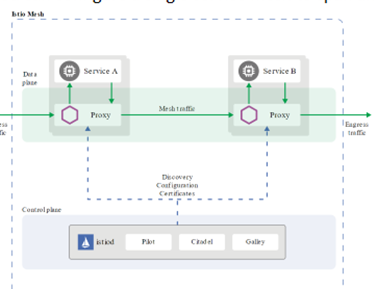
An Istio service mesh is logically split into a data plane and a control plane.

  • The data plane is composed of a set of intelligent proxies (Envoy) deployed as sidecars. These proxies mediate and control all network communication between microservices. They also collect and report telemetry on all mesh traffic.
  • The control plane manages and configures the proxies to route traffic.

 In Istio, configure a single service mesh to span any number of clusters, or can configure a single mesh to include multiple clusters 


Envoy Proxy:

Processes the inbound/outbound traffic from inter-service and service-to-external-service transparently. Istio components that interact with data plane traffic. Envoy proxies are deployed as sidecars to services. It will have Service entry (fully qualified name)


Some of the Istio features and tasks enabled by Envoy proxies include:

  • Traffic control features: enforce fine-grained traffic control with rich routing rules for HTTP, gRPC, WebSocket, and TCP traffic.
  • Network resiliency features: setup retries, failovers, circuit breakers, and fault injection.
  • Security and authentication features: enforce security policies and enforce access control and rate limiting defined through the configuration API.
  • Pluggable extensions model based on Web-Assembly that allows for custom policy enforcement and telemetry generation for mesh traffic

Istiod:

Istiod provides service discovery, configuration and certificate management. Istiod converts high level routing rules that control traffic behavior into Envoy-specific configurations, and propagates them to the sidecars at runtime

  • Pilot: Pilot provides service discovery for the Envoy sidecars, traffic management capabilities for intelligent routing (e.g., A/B tests, canary deployments, etc.), and resiliency (timeouts, retries, circuit breakers, etc.)

  • Citadel: Citadel enables strong service-to-service and end-user authentication with built-in identity and credential management. It provides encryption of traffic between Envoy Sidecar Proxies using mutual TLS
  • Galley: Galley is Istio’s configuration validation, ingestion, processing and distribution component. It is responsible for insulating the rest of the Istio components from the details of obtaining user configuration from the underlying platform (e.g. Kubernetes).

Virtual services route traffic to a given destination and use destination rules to configure what happens to traffic for that destination.

Ingress gateway configuration lets HTTP traffic from Istio ingress gateway into the mesh on port 80. To specify routing and for the gateway to work as intended, we also bind the gateway to a virtual service. 

setup Istio service mesh in AWS EKS

Prerequisites: 

·       kubectl v1.18.0

·       helm v3.2.1

·       Istio 1.8.2

·       terraform v0.12.30

·       aws-iam-authenticator

·       Programming access to AWS account. 

Complete view for Istio:

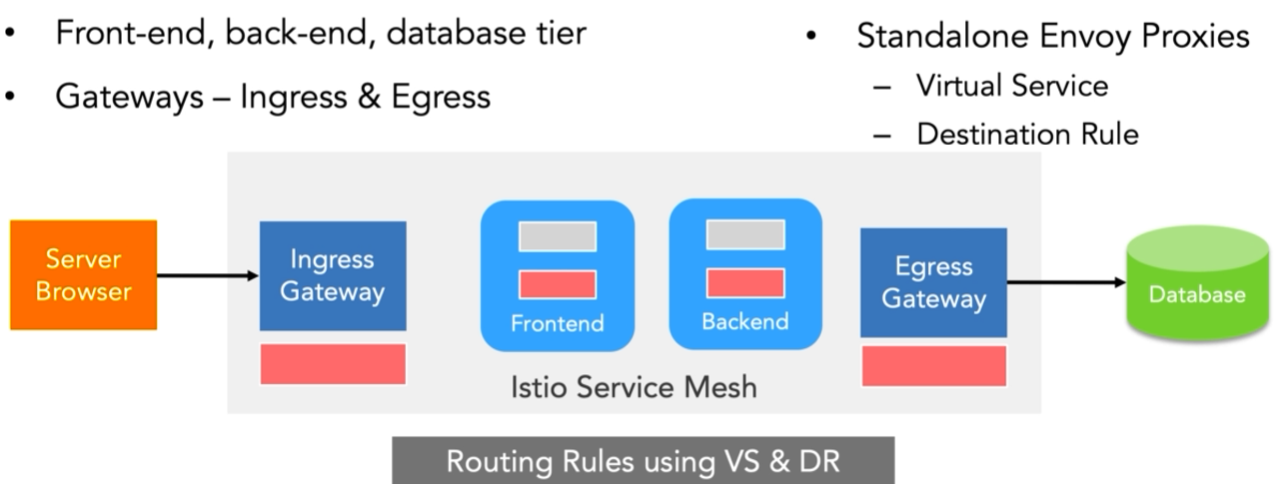
·       Istio Gateway - connect outside to Service Mesh clusters

·       Ingress Gateway - request coming in / request connecting to Service mesh

  •  It is Envoy proxies, running on separate POD as Istio proxy container, it runs only Istio Envoy Proxy nothing else on this container

§  Create Virtual Service
§  Create Destination Rule
§  Attach routing rules using virtual service and Destination Rule to Envoy proxies

  • Egress Gateway - Connecting from Mesh to outside
    •  It is Envoy proxies, running on separate POD as Istio proxy container, it runs only Istio Envoy Proxy nothing else on this container
    • §  Create Virtual Service
      §  Create Destination Rule
      §  Attach routing rules using virtual service and Destination Rule to Envoy proxies

·       Deployment for Ingress Gateway:

      • Running Envoy Proxies POD
    • Service for Ingress Gateway to connect to envoy Proxy

  • Service Object (Gateway Object) to enable Ingress Gateway to Receive Traffic from outside
  • Virtual Service to link routing services to routing rules to Ingress Gateway (Istio Proxy)
    • Gateways object will host details which will allow host / external world connect to the application and filters other requests.
  • Ingress Gateway Service come with Istio installation
  • There are two types of virtual service, first one at ingress gateway layer and other one is inside the service mesh.
    • Virtual Service enable further routing using "gateway", this "gateway" allow request to enter into Mesh and forward to Ingress Gateway/Proxy.
    • Other Virtual service will allow inter service communications and will configure on each POD with Istio Service Mesh


  • Launch k8s cluster in AWS EKS using terraform. deploy EKS cluster. prepare namespaces to Istio service mesh. deploy each application to own namespace.
  • Kiali is an observability console for Istio with service mesh configuration and validation capabilities
- Building an Istio service mesh for a microservices application deployed on Kubernetes


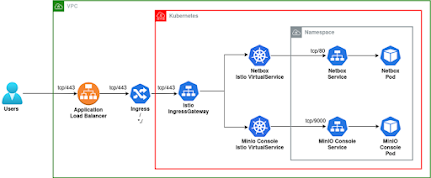
- K8, AWS ALB WITH ISTIO INGRESSGATEWAY:


All traffic through the IngressGateway, we can route traffic differently depending on hostnames, most easily by using prefixes, by using Virtual Services.


Wednesday, September 28, 2022

Kafka Internal


Kafka Components:


  • Producer
    • Publish the message to a topic, 
    • messages are appended to one of the topic

  • Consumer
    • Subscriber of the messages from a topic, one or more consumer can subscriber a topic
    • Subscriber can subscribe a topic from different partition, called consumer group
    • Two consumer of the same consumer group CAN NOT subscribe the messages from the same partition

  • Message
    • Kafka message consists of an array of bytes, addition to optional metadata is called Key
    • Kafka can write the message in real time and batch mode
      • Batch mode increases the throughput but decreases the latency, hence there is a trade-off between latency and throughput.

  • Events
    • An event represents a fact that happened in the past.
    • Events are immutable and never stay in one place.
    • They always travel from one system to another system, carrying the state changes that happened.
      • Topic groups related events together and durably stores them. 

  • Streams
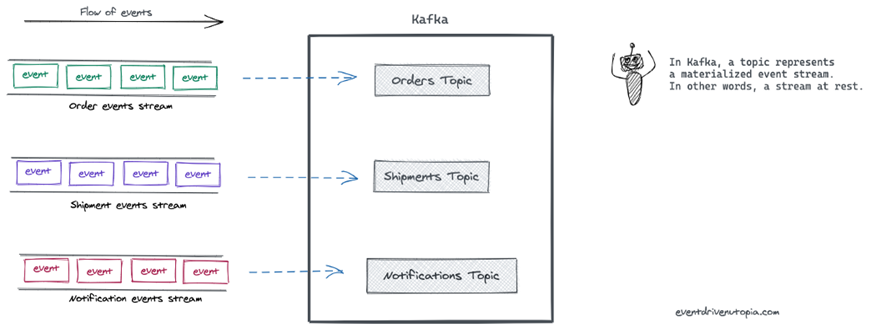
    • An event stream represents related events in motion.


  • Topic
    • topic is a logical concept in Kafka
    • Producers published the message to a topic and consumer consumes the message
    • Can be considered like a folder in a file system
    • Each topic can have multiple Partitions and message stored in Partitions
    • Topic is held by broker that stores events and managed by broker
      • a topic is a materialized event stream. In other words, a topic is a stream at rest
    • A topic is a stream of data comprising individual records
      • Example:
        • Kafka topic is a table in a database or folder in a file system 

  • Partition
    • Kafka’s topics are divided into several partitions. 
    • a partition is the smallest storage unit that holds a subset of records owned by a topic.
    • Each partition is a single log file where records/message are written to it in an append-only fashion.
 
  • Offset
    • Each record in a partition is assigned and identified by its unique offset
    • a sequence number is assigned to each message in each partition of a Kafka topic, this is called Offset
    • As soon as any message arrives in a partition, a number is assigned to that message.
    • For a given topic, different partitions have different offsets.
    • The offset number is always local to the topic partition.


  • Node
    • Kafka node host kafka servers (configure Kafka broker)
    • Kafka is a distributed, partitioned and replicated pub-sub messaging system.
    • Kafka stores messages in topics (partitioned and replicated across multiple brokers).
    • Producers send messages to topics where consumers or their consumer groups read
  • Broker
    • A broker is just an intermediate entity that exchange message between a producer and a consumer
      • For Kafka Producer,
        • it acts as a receiver,
      • and for Kafka Consumer,
        • it acts as a sender.
    • Brokers are heart of Kafka body that are also called the Kafka server.
    • Each server node in the cluster is a “broker,”
    • Handles all requests from clients (produce, consume, and metadata) and keeps data replicated within the cluster.
    •  There can be one or more brokers in a cluster.
    • A Kafka broker allows consumers to fetch messages by topic, partition and offset.
    • Kafka brokers can create a Kafka cluster by sharing information between each other directly or indirectly using Zookeepe
  • Cluster
    • Kafka cluster consists of one or more servers (Kafka brokers) running Kafka.
      • It is nothing but just a group of computers that are working for a common purpose
      • it also has a cluster having a group of servers called brokers
        • It have combination of Servers which will have brokers on it, means a server will have brokers, a multiple servers will have multiple Brokers which will called Cluster
    • Producers are processes that push records into Kafka topics within the broker.
    • A consumer pulls records off a Kafka topic.
    • Kafka cluster is a combination of multiple Kafka nodes
    • Producers send records to clusters
    • store those records and then pass them to consumers
    • Each server node in the cluster is a “broker,”
    • which stores the data provided by the producer until it is read by the consumer
    • A Kafka cluster has exactly one broker that acts as the Controller


  • Zookeeper
    • Management of the brokers in the cluster is performed by Zookeeper.
    • There may be multiple Zookeepers in a cluster
    • Keeps the state of the cluster (brokers, topics, users)
    • It manage and coordinate with the set of Kafka broker.
    • The Zookeeper service is mainly used to inform the Kafka producer and Kafka consumer about the presence of the number of broker in the environment or cluster.
      • It also keeps track of Kafka topics, partitions, offsets
  • Consumer Group
    • is a group of consumers
    • Multiple consumers combined to share the workload.
    • dividing a piece of large task among multiple individuals.
    • There can be multiple consumer groups subscribing to the same or different topics.
    • Two or more consumers belonging to the same consumer group do not receive the common message.
      • They always receive a different message because the offset pointer moves to the next number once the message is consumed by any of the consumers in that consumer group.
    • a single consumer read all messages from a single topic. A single consumer will read messages from a number of Kafka topics , generally a consumer will be configured in a group of consumers
    • multiple Consumer Groups reading from the same topic. Each Consumer Group will maintain its own set of offsets and receive messages independently from other consumer groups on the same topic. To say it simply, a message received by Consumer Group 1 will also be received by Consumer Group 2. Within a single consumer group, a consumer will not receive the same messages as other consumers in the same consumer group. 

  • Push
    • Consumer can be overwhelmed by flooded message by producer
    • Difficulties dealing with diverse consumers.
  • Pull
    • Consumer can pull the record as per capacity from broker
    • Batching is created for pulling the data as per consumer
    • Kafka can pull the batch on interval of time fix or the required byte size
  • Kafka services
    • Kafka Broker
    • Kafka consumer
    • Kafka Producer,
    • Zookeeper
  • Kafka Api
    • Producer API: used to publish a stream of records to a Kafka topic.
    • Consumer API: used to subscribe to topics and process their streams of records.
    • Streams API: enables applications to behave as stream processors, which take in an input stream from topic(s) and transform it to an output stream which goes into different output topic(s).
    • Connector API: allows users to seamlessly automate the addition of another application or data system to their current Kafka topics.

Kafka: Queue and Publish-Subscriber:


Kafka: Queue and Publish-Subscriber


References:

  1. https://www.cloudkarafka.com/blog/part1-kafka-for-beginners-what-is-apache-kafka.html
  2. https://kafka.apache.org/documentation/
  3. https://kafka.apache.org/quickstart
  4. https://www.educba.com/kafka-architecture/?source=leftnav