- User – Person Jam => User - individuals
- Resources – email => Resource is – gmail (email)
- Resource Owner - Jam is RO of email => Resource owner – person who have account in gmail
- Your identity owner
- Client –
- the application which wants to perform the action behalf of you (RO)
- Authorization Server –
- which knows the resource owner, RO already has an account
- Resource Server - Gmail (email server) => Resource server – Gmail Server
- It is an application interface or API/Service client wants to access behalf of resource owner
- Redirect URI –
- this is URL, authorization server will redirect to RO back to after granting to permission to client (call back url)
- Response Type -
- Authorization Code – type of information client expects to receive
- Scope –
- Granular level information which clients wants
- Read
- Write
- Update etc.
- Consent –
- AS takes the scope which client is requesting and verify with RO whether they want to give client permission.
- Client id –
- This id is used to identified client with Authorization Server
- client secret -
- secret pwd which client and authorization server will know
- Securely share the information privately behind the scene
- Auth code: to get an access token.
- Authorization servers send this to client and this live for short time frame
- Client will send this to Authorization Server along with client secrets in exchange to access token
- Client will get access token
- Client will use access token is key to communicate with Resource server (Key Card)
- Client can perform action which Client are authorized for
IDP and SP :
·
Identity Provider (IdP)
- tool / service (login page/dashboard) that performs authentication; checking
usernames and passwords, verifying account, if applicable invoking two-factor.
·
Service Provider (SP)
- The web application where user is trying to gain access.

v
OAuth Provider: OAuth Server or authorization
server
§
Consist of three components
-
Authentication
o
Login/Login page on web page
o
Identity provider
o
OAuth is front end for identity solution
-
Request Authentication consent from user to
delegation of access right to client. This is consent server. Consent server
request to verify do really user want third party can access user data.
- Token management infra – this is Database, maintained all token data which is provided for OAuth provider for validation or revocation.
v
Resource Provider’s: set of webs api
-
Makes Protected resource available via https. It
can be data, service or form of web API Which provide protected data
-
Web API make sure that only authenticated/authorized
user can accesses, it does through OAuth access token.
-
Check validity of provided access token, has
access token is provided.
v
Resources
Owner: end user
-
Owner of Protected resources, Owner of twitter
account is resource owner
v
Client:
Mobile or cloud app
Ø
OAuth Actors: play specific role in OAuth to
make it secure,
v
OAuth token: these are credential, unlock
something stored securely
v
OAuth endpoints: webservice/API/URLs which
realize OAuth Server
v OAuth Flows: there are 4 OAuth flow, when to use which flow
Ø
How to access APIs provided by facebook, google.


- Client Registration is very important
- Actual start
- Authorization end point first to authorization code flow
- Token end point and then access resource access
- User - individuals
- Resource server – Gmail Server
- Resource is – gmail (email)
- Resource owner – person who have account in gmail
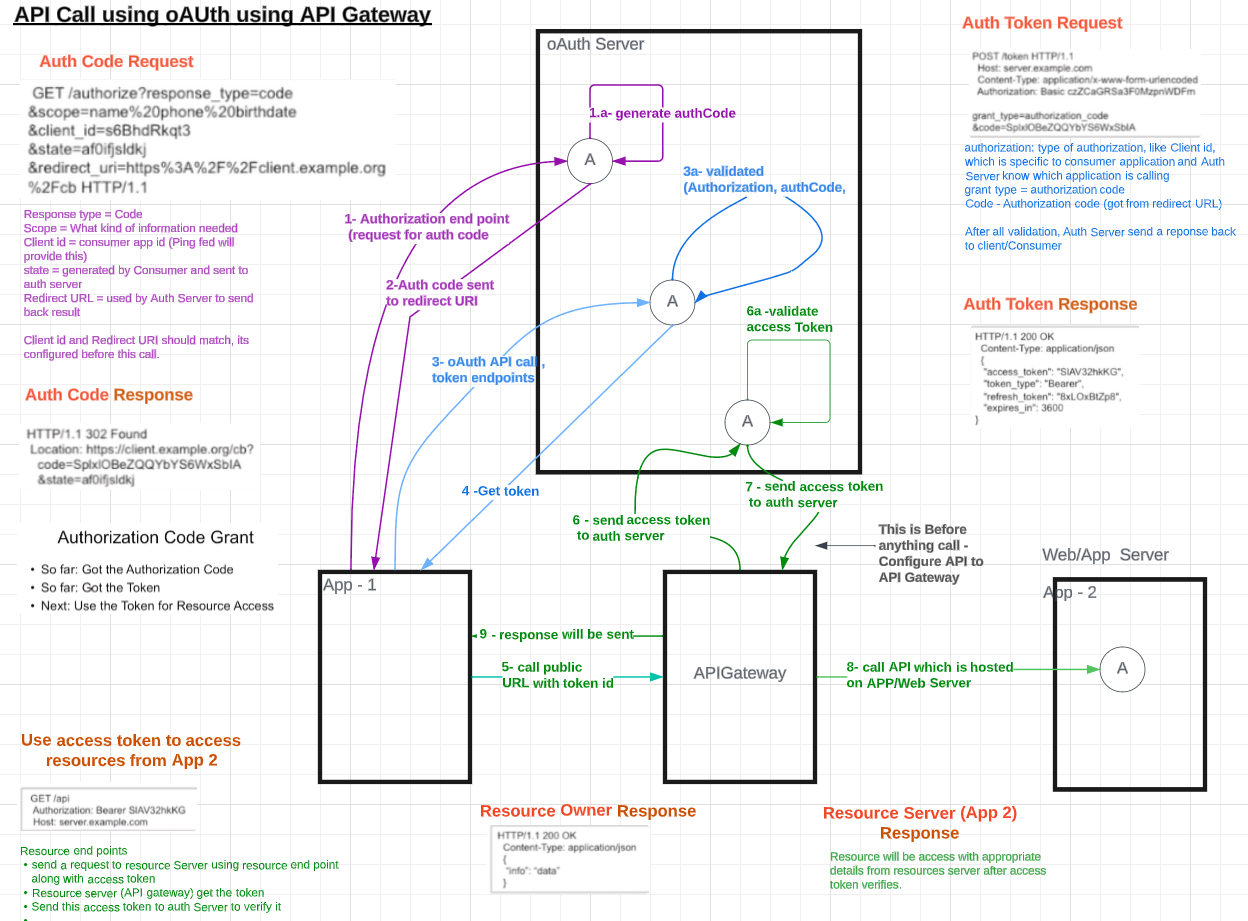
oAuth Flow:
Intermediate application contact OAuth Server, OAuth Server
send request to resource owner where resource owner will have entered required
credential. OAuth Server validate and authenticate resource owner.
OAuth server create token and send token to Intermediate
application. OAuth token (sequence of number and letters) will have resource
owner details along with other details. Intermediate application send this
token to resource server. Resource Server send this token to OAuth Server which
get validated (active, expiry, validation etc). OAuth server send confirmation
to resource server.
RS does own authorization and get resource send details to
Intermediate application.

- /authorize (get)
- Authorization code (for authorization code grant)
- Access token for implicit flow
- /token (post)
- Authorization: basic client-id: client-secret
- Access token and refresh token (for Auth code Grant, Client Credential Grant and RO password credential grant
v
Resource server holds resources and protect
resources
· Resources can be protected through-
o Via – pwd
o By OAuth token
v
Endpoints exist in OAuth solution
1. 1. Authorization endpoint – provided by OAuth Server (/authorize)
a.
Based on inputs parameter
i. Output can be either Authorization code (for authorization code grant) or Access token for implicit flow. It delivered through query parameter via redirect URI. This code is created by auth endpoint.
2. 2. Token endpoint – provided by OAuth Server
(/token)
a.
Based on input parameter including auth code
i. Output
can be either access token and refresh token code for all flow.
ii. Implicit grant does not use token endpoint
3. 3. Redirect endpoint – provided by client (redirect URI)
a.
Endpoint of the client, this is end point send
info from authorization end point back to client.
i. Input query parameter is output of Authorization end point but input to redirect endpoint this is receiving part of Auth end point (created by Auth end point)
4. 4. Resource endpoint – provided by resource (/api)
a.
This end point allow access to resource.
i. Authorization: Bearer (Access Token)
Access token – use
by client to access resources, client send token to resources server to access
resources (validity of access token varies, and it can be reuse multiple times),
it is bearer token. Based on access token resource can be access.
Refresh token –
period of validity which is longer than access token. RT can be requesting to
use AT. Requesting AT with RT, resource owner credential will not be validated.
RT are stored and sent by client. There send to token end point of OAuth, it
does not send to resource server, don’t use to refresh token to get resource it
only uses to get access token.
Authorization code –
auth provider creates auth code and send to client after successful
authenticating resource owner and getting consent from resource owner to
delegating the access. Auth code is confirmation of successful authentication
and consent by the resource owner. Validity of auth code is for limited time
period. client can use Auth code to request get access token from token end
point
Credential :
- Resource owner credential – This will be provided by resource owner to Auth Server
- Client credential: client id – client secret, this will be used when client uses token end point via
- http basic. Every client should have client id and will be provided by Oauth provider.
- Access token : can be treat as credential since it helps to get resources.
- Refresh Token: allow to get new access token
- Auth code: to get an access token.
Client Registration:
o OAuth server/Oauth Provider, end point and get client id and client secret .
o Client will provide to Oauth Server/Provider
o
Redirect URI
o
Required Scope – what type of information will
be access
· Client obtain from Oauth Server/Provider
o
client id
o
client secret .
- 3rd party app contact – OAuth server (request for resource access)
OAuth Server get request – web application/API –
Authorization endpoint – OAuth Server will redirect to Login Page
oAuth Flow:
OAuth Server get request – web application/API –
Authorization endpoint – OAuth Server will redirect to Login Page , Resource owner will enter id and password
which will be authenticate by login server or OAuth Server.
OAuth server will create Auth Token or Auth code (sequence
of number) and send this Auth code to third party app. Third party app use this Auth Code /token and
request resource using http header and send auth code. Resources Server get these values and send
this Auth code for validation. OAuth Server will send confirmation to Resource
Server. Third Party App will have access to resource owner
Authorization Code Flow Grant:
·
actors involved – Resource owner, OAuth Server,
Client
Client id and client secret can be provided
·
Token can be stored in protected DB so if
server-side implementation case this is recommendation if it is HTML5 or front-end
application than it is not recommendation since Auth code is gateway for
access.
o
Get Auth code (Authorize end point, client will request
for Auth code)
o
Get the token (client uses token end point,
client send auth code to token end point and get Access Token)
o
Use access token and access resources
o
Enables checking identity for 3 actors (Resource
owner, OAuth Server, Client)
v
Resource owner – who owns the resource
v
Resource server – Host and protect resources
· RW triggers this ACF.
· Goes to OAuth server ask for auth code (Auth end point)
· Redirect/take to login page
· RO entered details (Authentication
· OAuth Server send confirmation page to RO ad after confirmation third party can access RO requested details through OAuth Server.
· Got Auth Code – next is get the token – call token endpoint
Authorization code Flow:
Authorization Code Grant - refresh:
this refresh token which is saved on the client side and the client can now go to the auth server and refresh the validity of this access token.
How does this work?
Use the refresh token, which has a longer time of validity than the access token and as an answer from the OAuth server, it receives a new access token and a new refresh token with new time to live counting from that point in time.
In this refresh flow,
1- only the token endpoint of the auth server is used.
2- The authorization endpoint is not required and the authentication of the resource owner is not needed.
the refresh token, can help to get a new access token quicker and it can help to get there quicker (than going through resource owner authentication and requiring him to enter the password again , so refresh token can be used instead). That means if a refresh token as a client and the access token has expired, it cannot access the resources on the resource server any longer, but it can use existing refresh token to go to the OAuth server and request a new access token. In contrast to the regular authorization code flow, the password of the resource owner is not required.
The refresh token tells that the resource owner has authenticated and has agreed to the access before, So that way it does not have to bother the resource owner any longer about this issue. Just use the refresh token in order to get a new access token.
Access Token is expired and Refresh token is still active

Note: Dot purple flow is not valid during Refresh Token flow, but it is needed first to make sure that it should have refresh token and access token first place.
Implicit Flow Grant:
It is not using the token endpoint also not delivering any refresh tokens. This flow is used for clients that do not have the possibility to securely store the refresh token and the client ID and client secret.
This flow only have a call to the authorization endpoint and right from the authorization endpoint, it send back an access token. The token endpoint never been called, but it's only an access token that will be receive and no refresh token. The response sent back from the authorization endpoint does not contains the auth code, it contains the access token, the token type and some state. So a limiting factor of this flow is the short validity time of the access tokens, because the access token is sent directly without authenticating the client.

Client Credential Flow Grant:
The client and the resource owner are the same so it does not need to go authenticate the resource owner, because the resource owner is the client and the client is already authenticated by client ID and client secret.
The client is identical to the resource owner. Client credentials are sufficient and the resource owner is not required to authenticate. The client needs to offer secure storage for client ID, client secret and the access token and refresh tokens. Client Credential flow grant type delivers both access token and refresh token. Only one call is necessary to obtain an access token and a refresh token.
Reference:
- https://developer.okta.com/blog/2019/10/21/illustrated-guide-to-oauth-and-oid
- https://duo.com/blog/the-beer-drinkers-guide-to-saml
- https://www.learncsdesign.com/understanding-security-assertion-markup-language-saml/
